

In this issue: two product critiques for the price of one!
1) What’s bad about the Substack reader experience (and how I fixed it), and 2) Why AI code editors like Cursor won’t have a viable business model for long
Product critique #1: Fixing the Substack reader experience
Strolling down the Yellow Brick Road
I struggle daily to rally my mind for undivided attention. I mean the kind of sustained focus demanded by a book or by any text whose argument or voice can’t be flattened into a tweet.
In practice I get my best shot at long-form reading in bed at night, within a couple of hours of falling asleep. At that time of the day, for reasons both of sleep hygiene and focus, I find it helps to narrow my field of vision and enter a hermetic world, Oz-like, with just one Yellow Brick Road that doesn’t fork into a thousand paths tempting my mind to wander.

The awesome technology of a hard copy book naturally acts as a portal into that world, naturally ushering me along the Road with each turn of the page. But there is also plenty of long-form content I want to read online—newsletters, blogs but also traditional media like the New Yorker—which I do on a tablet that has been exorcised of distractions: it has no social media, email, messaging apps. Instead it mainly has a news reader, Feedly, which bundles these disparate online sources in a single app.
A news reader or feed reader gathers any content published in the standard format of an RSS feed and combines that content into a unified reader experience. Even if they don’t advertise it much, almost all providers around the web who publish with some regularity have RSS feeds—think news outlets, magazines, blogs, podcasts. RSS and news readers date back to ancient Y2K times and have peaked in the public consciousness a good while ago1, so don’t feel bad if you’ve never heard of them. But since Y2K is back in fashion, maybe we can make them happen again, yes?
A news reader like Feedly serves my goal of reducing distractions perfectly. It eliminates the need for a bunch of other apps and for visiting websites individually. It strips text from different sources of conspicuous design; everything is one font on one background color of my own choosing.
This stripped back interface is the closest a grab bag of digital content is going to get to the immersive linearity of a book. As I lie in my bed and tick off each item in my feed, an unread count goes down, nudging my mind towards closure, that this is going to be it for the day, that I will reach the Emerald City, well-known terminus of online.
Destacking Substack
Given that one of Substack’s original motivations was to foster long-form writing online you would think it would also care about long-form reading and it would be a great match for my reading habits. Not exactly, I’m afraid.
Substack early on settled on subscribe-by-email as the main mechanism to bring new readers on board, in what I assume was an uneasy trade-off. Entering an email address in a box (crucially, with no account creation required) is the lowest-effort action you can ask of a reader that still tangibly connects them with a writer. In this sense, email is the ideal distribution channel. Except now the writer’s work is trapped in an email client, sandwiched between a credit card bill and an appointment reminder from the dentist. There are few worse places to read long-form copy than an email client.
Reader ergonomics aside, email also doesn’t necessarily serve Substack’s needs. An email client is a restricted environment that limits the ways they can capture more of a reader’s attention. In product terms, it’s a classic downside of their piggybacking on a distribution channel that they don’t control. So inevitably, they were going to try to take back some control through their own distribution channel, the dedicated Substack app.
In the Substack app, the clues are plenty that it prioritises engagement farming over the reader experience. It opens not to the list of posts from my subscriptions but to the maximally distracting feed of Notes. Most phone notifications I get are for Notes, not new long-form posts. The subscription inbox lacks quality-of-life features important for focus, such as filtering by read/unread posts and reverse chronological sorting. (On a positive note, the app is blissfully free of ads—if you don’t count Notes as ads, that is…)
I understand the product argument that seems to be prevailing within Substack. It’s irrelevant how much of a publication’s content a user consumes or how focused they are while they do it, Substack’s product management would have claimed while showing metrics on a strong status quo bias they observed: subscribers tend to delay cancelling for a long while after they stopped paying close attention to a publication. That’s especially the case if the subscriber is given other low-effort ways to “connect” with the publication, such as Notes and Chats.
What moves the bottom line is new paid subscriptions, and that’s likely the key metric Substack is chasing. Engagement within the app is seen as the easiest way to learn a user’s revealed preferences, surface relevant publications to that user and eventually convert paid subscriptions.
So I follow the chain of events that leads to a muddled reader experience. There is never a compelling enough product reason to defragment a consumer’s attention. Substack’s product choices inevitably put it at odds with the reading habits I’m trying to uphold in order to preserve my capacity for undivided attention.
What’s left of that capacity, my ability to stay the course on the Yellow Brick Road, is a critical part of my mental wellbeing and a major source of my creative juices. I’m willing to go to some lengths to keep the Substack app off my distraction-free tablet. This is why I created Destack, which combines all of my Substack subscriptions into a single RSS feed.
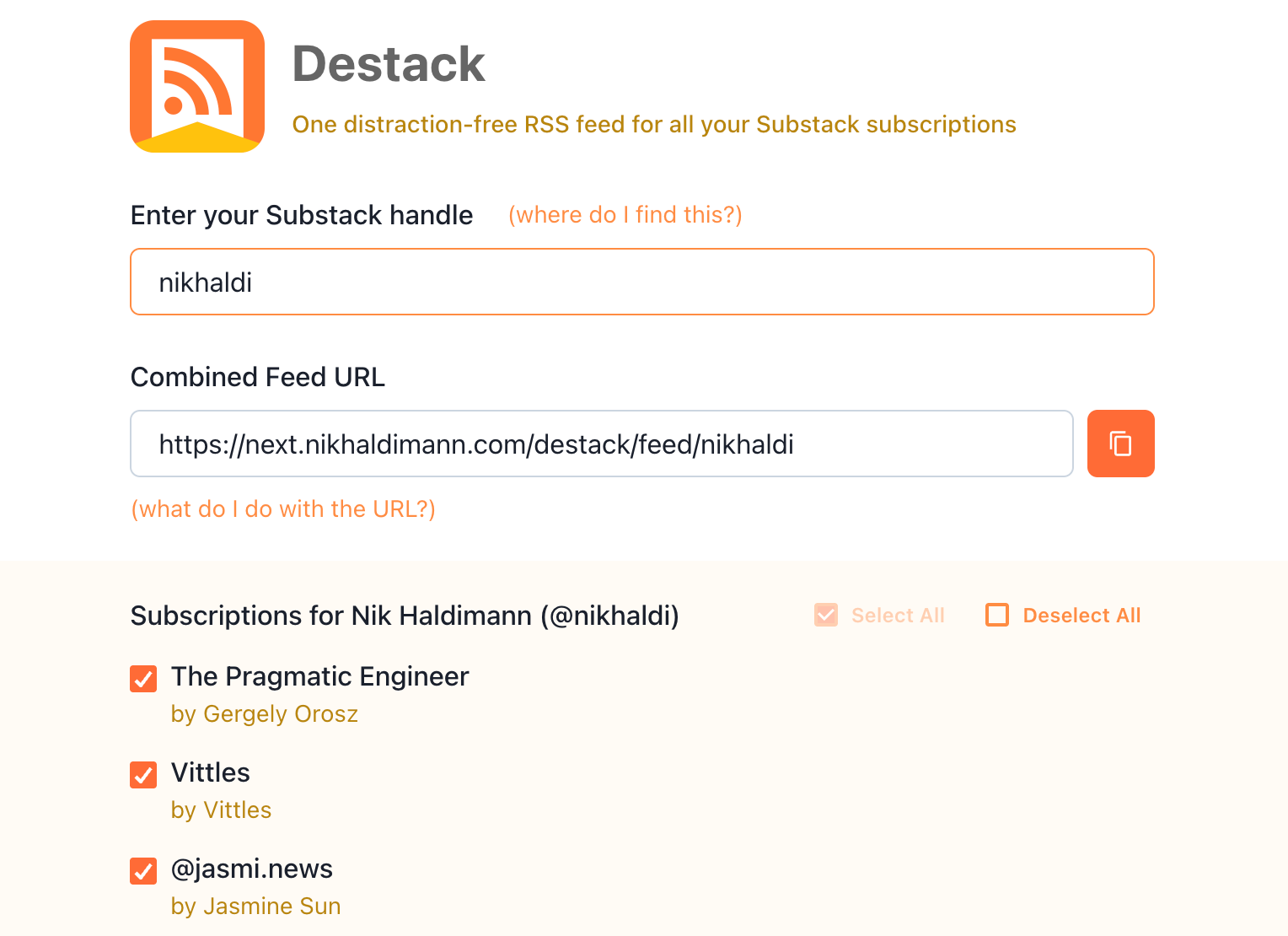
You can check out Destack and get your own combined Substack RSS feed now:
Enter your Substack handle
Optionally select only specific publications you want to be in your combined feed (some of you crazy kids have hundreds of subscriptions and will need to trim that list to get a stable feed)
Copy the feed URL into a news reader of your choice (some options: Feedly, NewsBlur, Feedbin)
To be clear, you don’t need Destack to consume Substack through a news reader. Each Substack publication has a feed, as documented here, but you’ll need to add each feed individually to your reader. Destack just makes this more convenient and will automatically pick up changes to your subscriptions.
The Substack that could have been
There was a time when Substack was on a different trajectory. All the way back in 2022 they proclaimed the “Revenge of RSS” when they launched a reader that supported other feeds alongside Substack subscriptions, and they used exactly the kind of language I’m pitching:
We’re invested in building distraction-free places for you to connect with the writers, readers, podcasters, and video-makers you love. In the new Reader, there are no pop-ups, auto-playing videos, or whirring gadgets. You’re in control.
Unfortunately that RSS-enabled reader was quietly sunset, it seems after a year or so. (And that promise of “no auto-playing videos” didn’t last much longer either.)
Substack, hear me out! Just because that particular experiment failed doesn’t mean you have to abandon your investment in “distraction-free places”. So let me close with some free suggestions:
Offer a personal combined RSS feed just like Destack but also include full paywalled posts in it. Duh. Steal it, I promise I won’t mind.
Bring back the general news reader capabilities. If you can’t fight the RSS die-hards, make them join you. Then you can farm more of their engagement. Personally, I would consider switching from Feedly.
Add a distraction-free mode to the Substack app, easily toggled on and off, which tunes out any notifications (those orange dots), recommendations and endlessly scrolling feeds in favor of a plain list of unread posts.
Don’t get me wrong, I truly appreciate the new product category that Substack has established, not to mention a new business model for writers, and for the most part I can tweak it to fit my needs as a reader. I just wish that a platform specifically founded on long-form writing was more alive to its users’ beleaguered attention spans.
Product critique #2: The trouble with Cursor
I created Destack exclusively using the AI editor Cursor, with an estimated 90% of the code written by its Composer model. Over the previous weeks I had already substantially exercised the AI capabilities of Github Copilot within VSCode and Claude within VSCode. Cursor was the final product in that same lineage that everyone kept telling me to try.
I came away skeptical about its long-term prospects, not because it was a bad experience but because of its positioning in the competitive landscape.
Models and frontends
Cursor is a fork of VSCode with a focus on integrated AI tooling, which on the surface makes it virtually indistinguishable from VSCode+Copilot and VSCode+Claude. These products have all converged on a small set of UX metaphors for AI-assisted coding: a chat side bar where an AI agent spells out the steps it’s performing, a list of files changed by the agent and a diff view for individual files to review and accept/reject those changes.
So how do these products differ then? Well, the underlying models are different. Or are they? At a certain point I admittedly got confused about the relationship between models and the in-editor agent experience, which for simplicity let’s call the frontend. I’ve cleared up my confusion with a diagram.
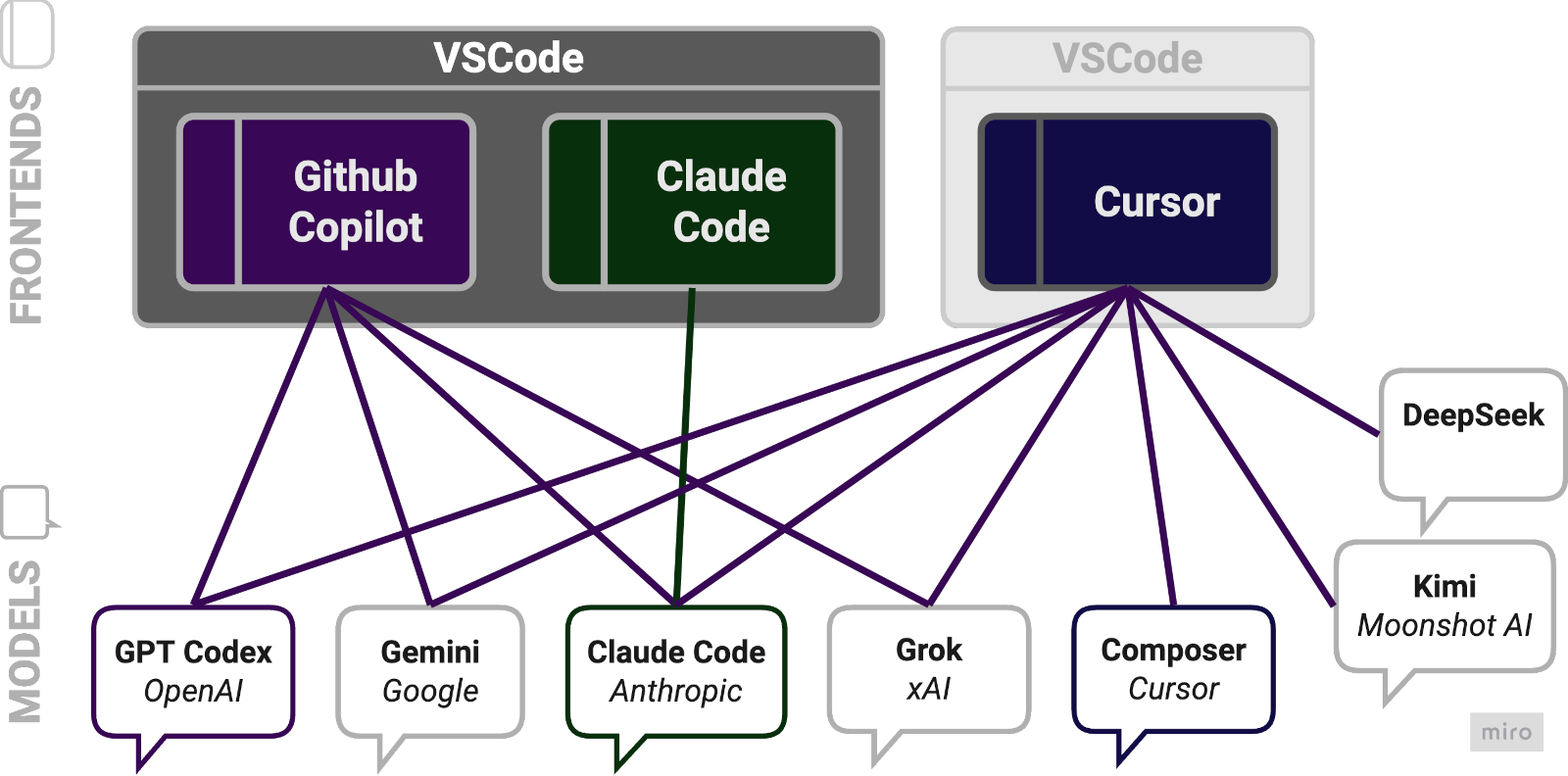
The Claude Code extension for VSCode is a straight-forward proxy for Anthropic’s models, with usage charged directly to a Claude account. The Copilot and Cursor frontends can both use all the big model players (OpenAI, Google, Anthropic, xAI). In addition, Cursor supports Chinese models (DeepSeek, Kimi) and has exclusive access to its own brand-new Composer model.
But what does it mean for Copilot and Cursor to be using multiple models? In reality they act as resellers of those models. A Copilot or Cursor subscription buys you usage across all supported models and the effective charges vary by model. E.g., right now Cursor charges $75 per million output tokens for Claude 4 Opus and a mere $0.4 for GPT-5 Nano (this changes often—check current Cursor pricing and Copilot pricing). The pricing is complex and dynamic enough that there’s no telling if you’re getting good value but I suspect the frontend margins are slim or in any case bound to approach zero over time because of competitive pressure.
Model wars
Both Copilot and Cursor let the user pick a specific model at any time but by default they operate in an “auto” mode, automatically selecting a supposedly appropriate model. This is documented only in the vaguest terms, and I would avoid it if you can. Copilot says (bolding my own):
With auto model selection, VS Code automatically selects a model to ensure that you get the optimal performance and reduce rate limits due to excessive usage of particular language models. It detects degraded model performance and uses the best model at that point in time.
Cursor describes it like this (bolding again mine):
Enabling Auto allows Cursor to select the premium model best fit for the immediate task and with the highest reliability based on current demand. This feature can detect degraded output performance and automatically switch models to resolve it.
Underscoring my point about converging products, these two descriptions are essentially identical and equally vague… I assume that “degraded model/output performance” is just marketing speak for “high latency”. I don’t trust these modes to make the right decisions for me because I don’t think the tools exist yet to monitor the dimensions of performance that actually matter, i.e., the quality of code written in relation to cost.
The product rationale for letting users switch between models and especially for “auto” mode arises from a set of circumstances that are very much of this moment in time in late 2025:
Models can’t keep up with demand at times (leading to the “degraded performance”)
Model usage is expensive
Model wars are raging with no clear winners emerging yet—new significant models are released all the time (just in November 2025: OpenAI’s GPT-5.1, Anthropic’s Opus 4.5, Google’s Gemini 3)
All of these circumstances will vary, potentially greatly, over the next few years but basic economics predict the direction of travel: Supply will be built out, prices will come down, and the field will narrow to a small group of dominant models. The latter is if we’re lucky—if history is any guide, these initial model wars might well end in a quasi-monopoly similar to Google’s after the search engine wars in the late 90s and Microsoft’s after the first browser wars in the same period.
90s on my mind
Forgive me, for I love a good historical analogy, and this current era in technology and software indeed recalls the second half of the 90s. I don’t mean so much the possibly similar boom/bust dynamics; it’s more the feeling of witnessing a similar cascade of unpredictable innovations, catalysed by the web then and by transformers now.
The coding frontends acting as a sort of meta model UX reminds me of a particular phenomenon of the 90s: the meta search engine. For a period during the search engine wars, you could arguably get the best search results from an engine that aggregated all the other engines which were subpar in different ways.
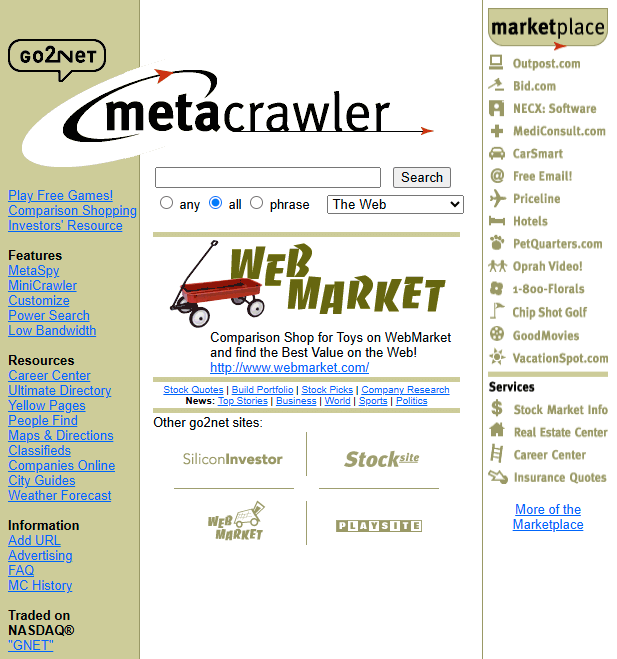
Take MetaCrawler. It started as a graduate project at the University of Washington, launched commercially in 1995, briefly shined during a typical series of boom-time acquisitions and then fizzled out in the 2000s as the dot-com bubble burst and Google began its dominant streak, which rendered MetaCrawler obsolete as a product because it was now pointless to consult any search engines other than Google.
Cursor right now is MetaCrawler ca 1998, and it’s in great danger of a similar decline into obsolescence. As models get better, cheaper and more reliable, the use case for frequently switching between models will go away. Users will directly buy quota for their preferred model and will stop paying Cursor as a middle man—just like users stopped visiting MetaCrawler once they learned they could get the best results from Google directly. I also think, while forking VSCode was a smart move to get initial distribution and mind share, it limits Cursor’s ability to differentiate itself on the frontend because any of their innovations can be replicated in the base product by VSCode too easily.2 (For a second time in this newsletter, remember the old adage: hitching a ride on a distribution channel you don’t control leaves you vulnerable.)
Of course the smart folks at Cursor recognise all of this which is why in October they launched their own model, Composer, at the moment exclusive to Cursor as a frontend.3 In a world where frontends for AI coding become a commodity with vanishing margins and value is mainly captured by models this is an inevitable next step. I commend Cursor for giving it a go with Composer but I’m not at all confident they will be able to compete with the bottomless R&D pockets of the likes of OpenAI, Anthropic and Google. I’m sorry to say, if such a thing was possible I would be shorting Cursor right now.
I have learned that I will feel most in tune with myself after I’ve sat down to read some long piece, ideally a book, but a substantial Substack post will do. Knowing this about myself doesn’t make it any easier to dodge the distraction merchants out here luring me with the promise of a cheap dopamine hit, hidden somewhere in their inexhaustible feeds.
Dear reader, I believe in you. You too can keep the distraction merchants at bay and instead subscribe to an exhaustible fortnightly newsletter about AI, software and product. Do it above!
—Nik
I think I can pinpoint the peak to just before 2013, the year Google Reader was shut down despite being the clear market leader. I understand the reasons for the decline of news readers, this could be a whole other product critique: as a product they are hard to monetize but, more fatally, they interfere with the monetization of content providers, as they don’t play well with paywalls, ads, metrics, branding and algorithmic feeds.
I can’t reconstruct the exact history, but I believe Cursor actually pioneered some of the AI coding UX in late 2024 and VSCode adopted almost identical features afterwards.
I mostly used Composer to write Destack and it seemed perfectly adequate but I have no way of benchmarking it directly against other models in the context of my hands-on coding. This inherent challenge of evaluating models in the real world is a topic for an upcoming newsletter.